
TransXChange
Examples 2.1 - Cloverleaf route
Summary
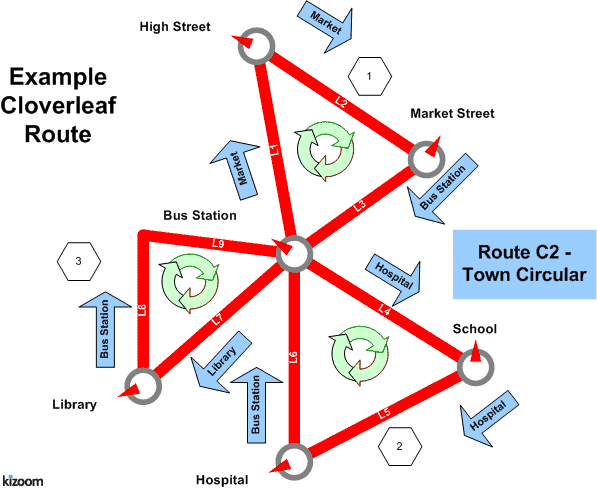
The bus traces out the outline of a cloverleaf shape with three petals. All vehicle journeys have the same timings.
- Multiple routes composed of shared route sections
- Multiple journey patterns composed of shared journey pattern sections
- Visiting the same stop more than once within the same route
- Frequent services with different Frequency Phrases
- Stop Sequence Numbers to control the timetable presentation matrix
- Dynamic destination displays.
- Short Working.
Published as: PDF
Route Map
Timetable
| #1 | #2 | #3 | #4 | #5 | #6 | #7 | #8 | #9 | #10 | |||
|---|---|---|---|---|---|---|---|---|---|---|---|---|
| 2 | 2 | 2 | 2 | 2 | 2 | |||||||
| Petal 1 | Bus Station | - | 11:00 | then about every 5 minutes until | 12:00 | then at 3-7 minutes intervals until | 13:00 | then at intervals of no more than 7 mins until | 14:00 | then at 3-8 minutes intervals until | 15:00 | |
| High St | - | 11:03 | 12:03 | 13:03 | 14:03 | 15:03 | ||||||
| Market St | - | 11:07 | 12:07 | 13:07 | 14:07 | 15:07 | ||||||
| Petal 2 | Bus Station | - | 11:20 | 12:20 | 13:20 | 14:20 | 15:20 | |||||
| School | - | 11:29 | 12:29 | - | - | - | ||||||
| Hospital | - | 11:48 | 12:48 | - | - | - | ||||||
| Petal 3 | Bus Station | 11:00 | 12:00 | 13:00 | 13:20 | 14:20 | - | |||||
| Library | 11:19 | 12:19 | 13:19 | 13:39 | 14:39 | - | ||||||
| Bus Station | 11:31 | 12:31 | 13:31 | 13:51 | 14:51 | - |
The XML Representation
Service Registration
- The service is not registered
- There is a single Operator.
Service Structure
- There is a single
Serviceinstance SV1, whose routes are all labelled as oneLine- '2'. - There are three
RouteSectioninstances, one for each leaf of the clover:- RS1, has three links between (L1) Bus Station to High Street, (L2) High Street to Market Street, (L4) Market Street to Bus Station.
- RS2, has three links between (L1) Bus Station to School, (L3) School to Hospital, (L5) Hospital to Bus Station.
- RS3, has two links between (L1) Bus Station to Library, and (L6) Library to Bus Station.
- There are five routes
Routeinstances defined:- R1, R2, R3, each with a single section (RS1,RS2, RS3 respectively) describing a single petal. (R2 is not actually used)
- R4 visits the first and third petals only (RS1 & RS3 ).
- R5 describes a route round all three petals, reusing the three sections (RS1,RS2, RS3) in succession.
- There are three
JourneyPatternSectioninstances JS1, JS2, and JS3, corresponding to the threeRouteSectioninstances, with corresponding journey pattern timing links. - There are five
JourneyPatterns,JP1 - JP5, composed from theJourneyPatternSectioninstances in the same way the routes are composed from the route sections. - There are six
VehicleJourneyinstances, one for each column:- VJ1 starting at 11:00 (column #1), references JP3 for its links, to run round the third petal.
- VJ2, starting at 11:00 (column #2), references JP5 for its links and so has eight vehicle journey timing links, corresponding to all eight journey pattern links.
- The Frequency element specifies that is a Frequent with a statutory ScheduledFrequency of every 5 minutes, and an EndTime of 12:00, FrequentService is true. The publisher generates both column #1 and column #2.
- VJ3, starting at 12:00 (column #3), references JP5 for its links, specifying only a different start time.
- VJ4 starting at 13:00 (column #4), references JP4 for its links, to run over the first and third petals
- VJ5 starting at 13:00 (column #4), references Vj4 for its links, to also run over the first and third petals
- VJ6 starting at 11:00 (column #5), references JP1 for its links, running over just the first petal
Operational Data
- The
DynamicDestinationDisplayis specified to change on certain links of the Journey pattern so that the heading changes between the outward and inward link, for instance for petal 1 at Bus Station and High Street it shows 'Market Street, but at Market Street, it shows 'Bus Station'
Use of Stop Sequence Numbers
Stop sequence numbers are used to coerce a specific ordering of the stops within a matrix timetable when published.
Frequency Phrases
The phrase used in frequency group column in the published output will be derived from the Frequency Parameters as follows.
| Frequency | ||||||
|---|---|---|---|---|---|---|
| Case | Frequent Service | Scheduled- Frequency Interval (mins) |
Minimum Frequency Interval (mins) |
(mins) | Result Phrase to show in matrix column for NON- REGISTRATION details | Result Phrase to show in matrix column for REGISTRATIONS |
| VJ2 | true | 5 | - | - | then about every 5 minutes until | Frequent service at least every 10 mins until |
| VJ3 | true | 7 | 4 | - | then at 3-7 minutes intervals until | Frequent service at least every 10 mins until |
| VJ4 | true | 8 | - | 7 | then at intervals of no more than 7 mins until | Frequent service at least every 10 mins until |
| VJ5 | true | 6 | 3 | 8 | then at 3-8 minutes intervals until | Frequent service at least every 10 mins until |
Alternative XML Representation
Vehicle Journeys #1 & #5 could also be coded to use the same Route & Journey pattern as Vehicle Journey #2 , using start and end Dead Runs to indicate short workings for the route. R1, R5, JP1, JP5 would then not be needed.
Notes
N.B. The variable phrasing for the Frequent Services is only available with the 20072.1 Enhanced publisher
Page last updated: 2013/04/13

